Shape Communities. Grow Your Career.
We know that building great communities starts with teams made up of great people. If you’re exploring ways to collaborate and make an impact, join us.
Explore Career Opportunities
By Terry Jiracek, CAD Designer
You are working in Revit on a project nearing the final deadline, and time is of the essence. You want to include the final detail in PDF format, but Revit generally does not support PDF files. What should you do?
You could redraw the detail, but you might miss your deadline. If only there were a way to import the PDF into Revit, you would not have to worry about missing your deadline.
Rest assured. There are ways to incorporate the desired system details and stay on deadline.
If you are using Revit 2020 or newer, you are in luck as direct PDF import is supported in Revit. Follow these steps:
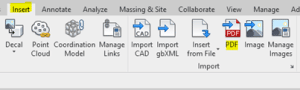
This image shows the “Insert” tab from Revit 2020.
For the pre-2020 Revit users, a few solutions are available to support PDF-based data in Revit:
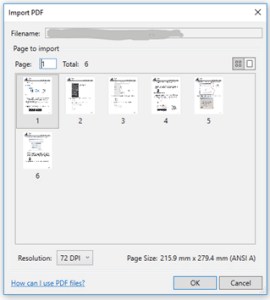
This image shows the import PDF viewer from Revit 2020.
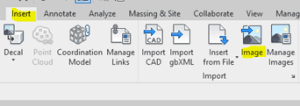
This is what the Insert tab looks like in Revit 2019.
As many engineering designers know, “one size fits all” does not necessarily apply when working in Revit. Importing issues are constant, and end-users must be savvy regarding the different pieces and requirements, such as the PDF itself, the software version, and the document’s desired look, before selecting an approach.
Since much of this work is artistic, no one solution will produce the same desired output appearance every time. Nor are the presented solutions for daily problems the only available options.
As tedious as they may be, all problems come with many forms of rewarding creative solutions! Take comfort in knowing that this method allows you to meet your project deadline while your desired design information is portrayed without the extra time and effort required to create the media from scratch.

As a Senior CAD Designer, Terry Jiracek enjoys playing an integral part in building design.
Learn more about Terry
We know that building great communities starts with teams made up of great people. If you’re exploring ways to collaborate and make an impact, join us.
Explore Career Opportunities